
Lieferzeit in ganz Litauen: 5-10 Werktage
Lieferpreis an die angegebene Adresse: 3 Euro




Trumpai apie prekę
Prekė: Vaikiškas išmanusis laikrodis STELIO 4G LTE GPS, skambučiai, SMS, atsparus vandeniui, SIM, kamera. Kategorija: Išmanieji laikrodžiai.
- Gamintojas: Stelio
- Modelis: Junior
- Svoris: 50 g
- Spalva: blue
Are you looking for a safe and modern way to connect with your child without buying them a smartphone?
STELIO Junior 4G is a smart watch with GPS, LTE, SOS and video calls – perfect for the little ones. It’s more than a smartwatch – it’s parental peace of mind and child freedom in one device.
✅ Key Features of STELIO Junior 4G
Secure communication – video calls, voice and SMS without the need for a smartphone
Precise location – real-time GPS + WiFi + LBS technology
Safety zones – alerts when the child leaves the designated area
SOS button – instant notification of the parent with one click
LTE 4G + WiFi connectivity – fast, stable connection in any situation
Voice monitoring and remote photo – ambient control from the STELIO Tracker application
Camera – simple photos and video calls for everyday contact
Lesson plan and lesson mode – focus during school activities
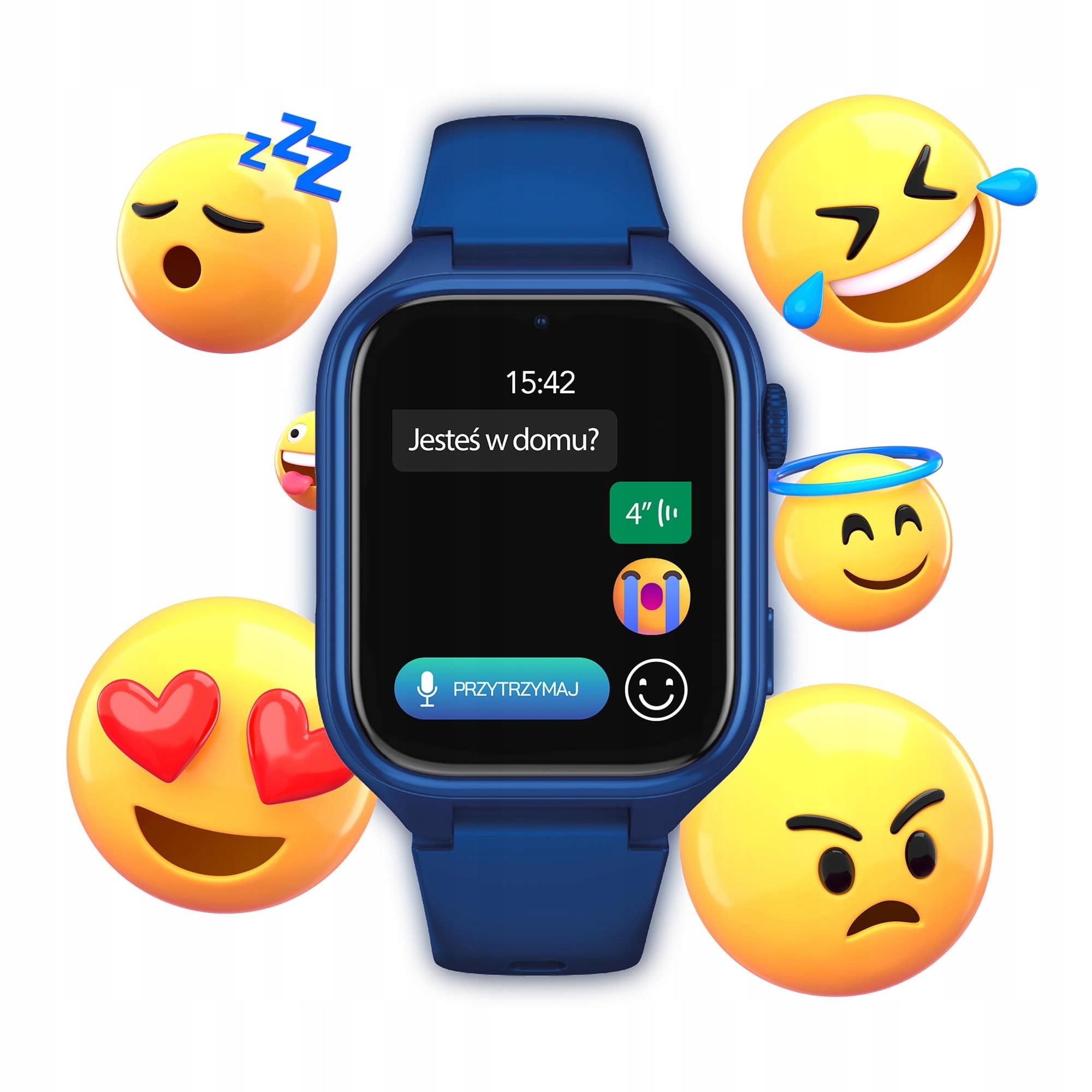
Voice messages, emoji and predefined SMS – an easy form of contact
Pedometer – monitoring the movement and healthy habits of the child
1,75” IPS + Gorilla Glass screen – durability, resistance and readability
Water resistance IP67 – splash, rain and play resistance
Memory 128 MB + 64 MB RAM – space for photos and user data
700 mAh battery – long operation + energy saving mode
GDPR Compliance – full protection of child data and privacy
✅ Full communication without phone
STELIO Junior 4G enables:
- phone calls,
- voice chat and emoji messages,
- video calls over the 4G network,
- SMS with predefined answers – e.g. “I am there.”
Thanks to this, the child remains in contact with the family, without the need for a smartphone.
✅ Real-time location of the child
With GPS + WiFi + LBS technology, you always know where your child is.
In the STELIO Tracker application, you can set safety zones (e.g. school, home) and receive notifications when they are abandoned.
✅ SOS button – one click, immediate help
In an emergency, the child can press the SOS button, which immediately triggers the phone call to the parent and sends the alert to the Stelio Tracker application.
It is a simple and effective solution that gives the child a sense of security and the parent peace of mind.
✅ Battery for longer – up to several days of operation
Thanks to UCVS technology and a capacious 700 mAh battery, the smartwatch lasts up to several days on a single charge.
In addition, energy saving mode automatically blocks unnecessary functions.
✅ Lightweight, comfortable and safe – ideal for children’s hands
The watch weighs only 50 g and is only 13 mm thick.
Compact and ergonomic design is designed for everyday wear by children – comfortably and without discomfort.
It is also a safe technology for the youngest – instead of open access to the Internet and social media, the child uses only carefully selected communication functions.
STELIO Junior 4G is an ideal alternative to a smartphone – it combines contact with family, daily convenience and no risk of digital overload or online threats.
✅ Secure phone book + SMS + SOS function
You can save up to 15 trusted contacts, including 3 SOS emergency numbers. Thanks to the blocking of calls from unknown numbers, only family and loved ones can contact the child – no unwanted calls or spam.
The watch also supports SMS messages, thanks to the modern Unisoc W117 chipset. The child can not only receive text messages, but also respond with one click, choosing one of the 5 predefined messages, e.g. “I’m there” or “I’ll call you later.”
You don’t have to write anything – everything is done quickly and intuitively.
In addition, in emergency situations, a special SOS message is available: “I need help! ”, which immediately notifies the guardian and sends the child’s location. It is a full, safe and childishly simple form of contact – even in difficult times.
✅ Voice messages and emojis – contact on children’s terms
STELIO Junior 4G as the only smartwatch with the RTOS system offers not only support for SMS, but also voice chat – the child can send short voice messages by pressing only one button.
In addition, communication is diversified by colored emoji, which makes talking to loved ones more fun, light and adapted to children's sensitivity.
It is an intuitive and secure way of communication, available without the need for a smartphone.
✅ IP67 Waterproof + Gorilla Glass – for rain, fun and everyday adventures
You do not have to remove the watch when washing your hands or in the rain.
IP67 resistance class protects against water and dust, and Gorilla Glass protects the screen from scratches and light impacts.
It is a watch that can easily withstand children's adventures - in all conditions.
✅ More peace of mind for the parent – full remote control
The watch is equipped with a hand-held photo sensor, remote camera photo and ambient voice monitoring – all available from the Stelio Tracker application.
- In addition, you have insight into the history of calls and messages so that you always know who and when your child is contacting.
✅ Lesson mode and stranger blockade – focus and protection
During the designated hours, STELIO mutes functions so as not to distract the child while learning.
- Blocking unknown numbers allows you to receive only calls from saved contacts – full control and security of communication.
✅ Personalization – sounds, dials and emojis
The child can choose color watch faces, set their own SMS sounds, alarm clock and calls and use the emoji message.
These are the features that make the watch more personal and fun.
✅ Full data protection – compliance with the GDPR
STELIO takes care of the security of the child's information thanks to encrypted servers and compliance with GDPR.
If you lose your watch, you can:
- track the location,
- block access to data,
- start a loud signal or
- remotely lock the device with a password.
The peace of the parent and the privacy of the child are always in the first place here.
The set includes:
- Smartwatch STELIO Junior 4G
- Charging cable - 0,8m
- SIM card slot opener
- Quick Start Guide (short instructions)
- Warranty card
- Welcome card
SUPPORT - JUNIOR 4G / JUNIOR PRO AI 4G
Why is the watch not charging?
Possible causes:
1. The battery could have completely discharged if the watch had not been used for a long time. Charge it for at least 15 minutes before checking if it is charging.
2. Make sure you use a standard charging adapter.
3. Charging contacts on the watch and magnetic wire may be dirty. Clean them regularly.
4. The magnetic cord may be incorrectly connected. Align the charging contacts of the watch with the metal cable contacts until they are properly connected. An animated loading symbol should appear on the screen.
5. Check the power source: make sure the power strip is on, the USB port is working or the adapter is not damaged.
6. If none of the above methods work, the watch may be damaged.
The watch does not see the SIM card – what should I check?
Check that the SIM card is active and has been correctly placed in the slot. The card should be compatible with 2G/3G/4G LTE network and enable data transmission. Also, make sure that there are funds in your card account that allow you to use the Internet. The correct placement of the SIM card is shown in the illustration in the instruction manual.
Why is the location of the child not visible?
Make sure that the SIM card has an active Internet packet. The watch must be within range of both GSM and GPS networks. Sometimes it can be helpful to restart the device. It is also worth remembering that in enclosed spaces or surrounded by high buildings, the GPS signal can be significantly weakened.
Why does the watch show that it is offline when I try to locate it?
Possible causes:
· No funds on the SIM card or the watch is off.
· No network connection – check the network status on the main screen of the watch. If there is no connection, restart your watch or connect to Wi-Fi.
· Poor signal – e.g. in an elevator, basement, subway or high-speed train.
· Battery saving mode – the network is turned off.
Why is the location sometimes inaccurate?
The watch uses GPS, Wi-Fi and cellular network transmitters (LBS) to determine location. Accuracy depends on the environment:
· GPS: approx. 10 meters
· Wi-Fi: approx. 450 meters
· LBS: approx. 550 meters (or more in practice)
The watch cannot be located when it is turned off or there is no network connection.
How can I correct an inaccurate location of the watch? (WiFi/LBS)
With a weak GPS signal and less accurate positioning of the device via LBS or WiFi, this solution can be used:
If there is a deviation of position, please long press and drag the device marker on the map to the correct place, manually enter the exact address information and save. The next time the device approaches the saved location, the location will be more accurate.
When the positioning method is GPS, manual correction will have no effect.
Can the watch be placed in school mode?
Yes, the location works even when the watch is muted in school mode.
How long does it take to fully charge the watch?
A full charge usually takes between 2,5 and 3 hours.
How can I improve the battery life of my watch?
Make sure that the watch software is up to date. Then:
· Turn on “Auto on. /off. devices” in the [More] section of the app.
· Set the location mode to “Energy Saving Mode” in the [Location] section of the app by clicking “...” in the upper right corner and selecting [Location Mode Settings]. This will force the app to check the location of the watch only manually.
Lower positioning frequency significantly increases battery life.
· Enable “Energy Saving” in the [More] section of the app. The watch will go into economy mode with a low battery (about 20%), leaving only the ringing function. On the main screen you will see a message: “Battery Saving Mode has been enabled”.
· Check if “Continuous heart rate measurement” or “Watch photo alert” is turned off. Power consumption increases significantly with the activation of these functions.
Why can't I turn off my watch?
The "Watch Off Lock" feature can be enabled in the app. You can turn it off by going to [More] – [Device Settings] and turning off the “Watch Shutdown Lock” function switch.
How to connect the watch to the app?
1. Insert a valid SIM card into your watch.
2. When the watch connects to the server, go to the [Bind] menu on the watch – a 10-digit association code will appear.
3. Open the app and scan the QR code or enter the code manually.
4. Make sure that the region you selected in your app matches the default watch server.
Will the watch work abroad?
Yes, provided that your SIM card has data roaming activated and supports 2G/3G/4G network in the country where you are staying. The card should be compatible with 2G/3G/4G LTE network.
Why doesn't the watch ring on incoming calls?
Why is there no sound?
Check the volume settings on your watch by going to [More] – [Settings] – [Volume Settings] to make sure the volume is not too low and silent mode is not turned on. If there is still no sound during calls, the watch may be damaged.
How to set the correct date and time on the watch?
The watch will automatically synchronize the time with the server when the SIM card is inserted. Alternatively, when you pair your watch with the app, you can manually set the time zone in the app settings.
Can the watch be worn while swimming, washing hands or bathing?
The watch is water resistant for everyday activities such as hand washing, but is not suitable for swimming, diving or activities related to rapid water flow or immersion to a greater depth.
Why does the watch heat up?
Possible causes:
· The 4G network supports high-speed data transfer, which generates heat.
· The watch system is based on Android and requires efficient components that can heat up.
· The small size of the watch limits the possibility of heat dissipation.
· Video calls and 4G-VoLTE HD calls consume more power and generate more heat than traditional voice calls.
· Fast charging also generates heat, which is typical for all electronic devices.
Why does the watch display a high temperature warning?
The watch displays a high temperature warning when the NTC sensor (with a negative temperature coefficient) detects that the battery temperature has exceeded a certain threshold.
NTC detection standards:
During charging: 50°C triggers a warning and interrupts charging. Charging resumes at 45°C and the warning disappears automatically. At 55°C, the device turns off.
In addition to charging: 45°C triggers a warning that disappears at ≤42°C.
How long can video calls last?
Video calls are limited to 5 minutes to prevent the watch from overheating.
Why am I not receiving a verification code when registering by email?
Verify that the email address is entered correctly.
Make sure that your mailbox settings do not block unknown senders and check your SPAM folder.
Why can’t I log into the app after registration?
Make sure that your login credentials are entered correctly by paying attention to the case.
Accounts cannot be used in different regions.
For example, an account registered in the US region will not work in the Europe region.
How to add other family members to watch management?
The administrator can view a QR code in the app that other people will scan to send an access request. The administrator must approve the request to allow others to use the application.
Why don't I get notifications?
Make sure your app has all the necessary permissions, such as notifications, background action, and autostart.
Open the app regularly to avoid it being closed by your phone system.
Why can't I record or listen to voice messages?
Verify that the app has microphone permissions enabled in your phone settings. If the problem persists, uninstall and reinstall the app, allowing access to the microphone the first time you start.
Why can't I see the child's chat history?
For reasons of protecting children’s privacy, the history of messages between children is not available to parents. Application interfaces do not allow you to preview other people's messages.
Why don’t I get voice chat or video call notifications?
Make sure that the application has all the required permissions – notifications, background action, autostart. Open the app regularly to avoid it being turned off by the system.
How many contacts can I add to my watch?
You can add up to 15 contacts, 3 of which can be emergency contacts.
Specifications
| Group | Name | Value |
|---|---|---|
| Parametry | Condition | new |
| Parametry | Invoice | With VAT invoice |
| Parametry | Packaging status | original |
| Parametry | Kind | kids' smartwatch |
| Parametry | EAN (GTIN) | 5902510616717 |
| Parametry | Brand | Stelio |
| Parametry | Model | Junior |
| Parametry | Certificates of conformity | CE |
| Parametry | Manufacturer code | Smartwatch telefon dla dzieci rozmowy SMS SIM |
| Parametry | Touchscreen | yes |
| Parametry | Kinds of activities | walking |
| Parametry | Color | blue |
| Parametry | Case color | navy blue |
| Parametry | Strap material | synthetic material |
| Parametry | Case material | synthetic material |
| Parametry | Case width | 40 mm |
| Parametry | Case height | 48.6 mm |
| Parametry | Case thickness | 13 mm |
| Parametry | Weight | 50 g |
| Parametry | Product weight with unit packaging | 0.24 kg |
| Parametry | Case shape | rectangular |
| Parametry | Built-in memory | 128 MB |
| Parametry | Battery kind | lithium-polymer battery |
| Parametry | Battery capacity | 700 mAh |
| Parametry | Communications | Wi-Fi |
| Parametry | Operating system | other |
| Parametry | Ports | nanoSIM |
| Parametry | GPS locator | yes |
| Parametry | Waterproofness | yes |
| Parametry | Wireless charging support | no |
| Parametry | Data transmission | 4G (LTE) |
| Parametry | Sensors | pedometer,heart rate monitor |
| Parametry | System compatibility | Android,iOS |
| Parametry | Batteries included | yes |