
Lieferzeit in ganz Litauen: 5-10 Werktage
Lieferpreis an die angegebene Adresse: 3 Euro

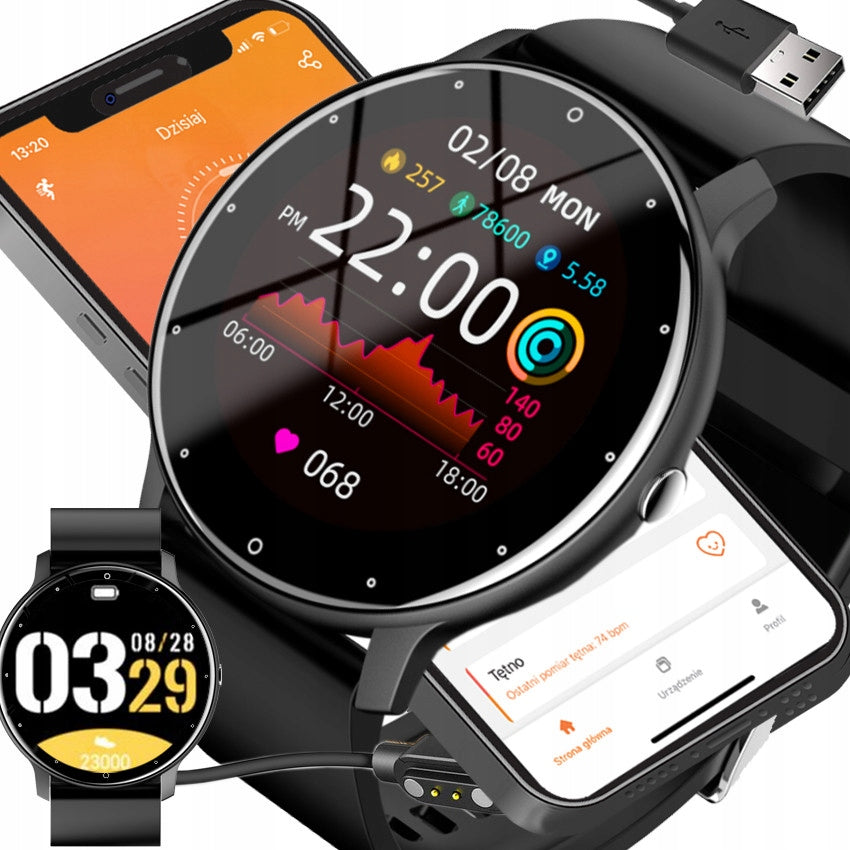


Trumpai apie prekę
Prekė: Išmanusis laikrodis vaikams, su telefonu, žingsniamačiu, pulso matuokliu, sporto režimais. Kategorija: Vaikams.
- Gamintojas: Rubicon
- Modelis: Rubicon Pure F16-B2
- Spalva: black
✅NEW! Built-in microphone and speaker - ABILITY TO MAKE CALLS
✅Super Battery: 230mAh !
✅Bluetooth 5.2! (Efficient and fast)
✅ Case HYPOALLERGENIC !
⭐SMARTWATCH WATCH MENU PL SMS PULSE ⭐
✨G R A T I S gift bag (selectable from the list below)
⬇ Color Version of Smartwatch ⬇
⬇ Color Version of Smartwatch ⬇
Case: Black
Strap: Silicone strap black
G R A T I S HYDRO-IRON FILM PROTECTION + SET OF DRY AND WET CLOTHS
- SMS notifications,
- distance travelled,
- pedometer,
- burned Calories,
- heart rate with a history of measurements,
- blood pressure,
- heart rate measurement HX3600(PULSE METER), blood pressure measurement, blood oxygen measurement (PULSE OXIMETER),
- sleep monitoring,
- 8 sports modes + breathing training + synchronization with Google FiT
- stopwatch,
- 4 games
- music control MP3 player on the phone additionally with volume control !
- phone app - in Polish
- reminder of the alarm,
- reminder of sitting mode,
- Screen on/off function
- turning on the screen when raising your hand,
- remote photos on the phone,
- Finding your watch with your phone.
- Menu ( 2 themes ) and application in Polish !
- TFT IPS full round display! 1.39”
- high resolution: 360*360 pixels
- Shield: 7 themes to choose from + shields to download from the app! + own shields! Animated graphics!
- NEW! in Shield mode - side extendable Quick access panel for applications on your smartphone!
- Bluetooth Call! Built-in microphone and speaker (can be quickly on/off from the smartwatch position! )
- receiving and making calls + list of calls
- Processor: RTL8763EWE
- Bluetooth 5.2! (Efficient and fast)
- Waterproof: Splash-resistant
- case made of ABS plastic, covered with IPS/IPG method, does not contain nickel, is HYPOALLERGENIC!
- possibility of changing the strap ( 22mm )
- mineral glass
- Super Battery: 230 mAh
- cooperation with iOS and Android software
- application: DaFit
- envelope dimensions: diameter:46x gr:11 mm
✨Do you want the watch to be primarily functional practical and comfortable?
Advantages of the smartwatch Rubicon F16
Relations: ⭐⭐⭐⭐⭐
➡ High screen resolution:
- With a resolution of 360x360 pixels, it provides a clear and sharp display, making it easy to use a variety of functions.
➡ Built-in microphone and speaker:
- It is a significant innovation that allows you to make calls without having to take your phone out of your pocket. A convenient and practical solution for people constantly on the move.
➡ Super Battery:
- It has a battery capacity of 230mAh, which means long-term use without the need for frequent charging. This is especially important for active people who want to make sure that the device does not disappoint them during the day.
➡ Bluetooth 5.2:
- With this cutting-edge technology, the watch boasts a fast and cost-effective connection to other devices, resulting in smooth operation and minimal power consumption.
➡ Hypoallergenic case:
- This feature makes the watch safe for people with sensitive skin or allergies, eliminating potential problems with allergic reactions.
✨This smartwatch is the perfect choice because it gives you many possibilities...
In conclusion, this Smartwatch-Smartband combines innovative features with high-quality workmanship, providing the user with both convenience and reliability in everyday use.
From the smartwatch, there are several dials to choose from. After connecting to the application, we have the ability to download new shields. In the application you will find about 100 additional shields!
The ability to personalize the appearance of mobile device screens allows you to customize them to your individual style and sense of aesthetics. Choose from multiple dials in the application and the ability to set a photo from your own gallery on your phone that will bring back amazing memories.
- TFT IPS full round display! 1.39”
- high resolution: 360*360 pixels
Thanks to the battery saving function, you can extend the working time of the watch enough to reach your home or the nearest power source and ensure charging. Running it disables some functions.
With the voice assistant feature, you can issue commands. Intelligent voice assistant will work not only when we are sitting at the smartphone, but also when we are on the move.
SMARTWATCH CAN BE CONNECTED TO YOUR SMARTPHONE USING THE DaFit APP
Play your favorite music while you train straight and comfortably from your smartwatch with the built-in player. All you have to do is connect your watch to the app.
Notifications about incoming calls, SMS messages, Messanger, WhatsApp. You won’t miss any important information. Without reaching for your phone, you will see all these messages directly on the screen of your smartwatch.
Raise your hand to see them so you don’t miss any important information. Without reaching for your phone, you will see all these messages directly on the screen of your smartwatch.
When you raise your hand and look at your watch - the screen of the smartwatch will automatically light up and tell us the time.
Set your daily step goals on an ongoing basis. If you are not yet an athlete, this option will encourage you to the world of sports. The watch shows the number of steps taken on a given day and gives an approximate distance in kilometers.
We can wear the watch freely when washing our hands or on a rainy day. We do not recommend wearing the watch while bathing or swimming because it is not designed for this purpose.
DaFit works completely in Polish, the application can be installed for free from Play Market or AppStore, in the application there are such functions as:
- history of steps, calories burned and pulse and pressure
- deep and shallow sleep monitoring
- Setting daily goals for the number of steps
- Detailed history of records made when using all seven sports modes
- detailed history of health measurement records
- Finding your watch using the smartphone app
- find watch function
- Enabling attention mode for long sitting without movement
All this data is stored and you can keep track of all activities recorded from the beginning of the watch. From the application you can find a lost watch within bluetooth range, turn on notifications on the watch about incoming calls and messages, the watch has the ability to read SMS messages. It will notify us of too long a time without movement, loss of connection between the watch and the phone and notifications from WeChat, QQ, WhatsApp, Facebook and Line.
HEART RATE AND BLOOD OXYGEN MONITOR in one click
The watch is equipped with the latest generation optical sensor, which allows measurement of heart rate, blood pressure and the level of its oxygenation.
The data is displayed in real time directly on the watch screen and is saved in a dedicated phone application.
Health Features:
- measurement of heart rate
- measurement of blood pressure
- measurement of blood oxygenation
The watch is equipped with a pressure sensor. After connecting the watch with your phone, you can use a dedicated application that saves all pressure readings from the whole day and beyond. Sync your data with the mobile phone app to keep an eye on your health. With this watch, you are aware of how your body reacts in different situations.
You can save all this data in the application, thanks to which a history of your results is created
The smartwatch is equipped with a Timer, which is essential for training, running or swimming, as well as useful for anyone who leads an active lifestyle.
The smartwatch is equipped with a quiet, vibrating alarm thanks to which we will wake up from sleep without waking up all household members.
The watch has weather monitoring functions. After connecting the watch with the application - on the watch we will be able to read what the weather is currently outside the window and what temperature we can expect after leaving the house.
We mean here:
- UV meter
- air pressure in hPa
With one click you will take a remote photo from your wrist
Rubber band with a decent steel buckle that perfectly adapts to the hand and provides an attractive appearance. Fastening buckle is the most durable form of hand watch fastening
It allows you to assess how long the phases of our sleep (deep, shallow), its duration and wakefulness last. All this data is saved in the application, and thanks to their monitoring you can improve the quality and depth of your sleep, which will cause you to wake up in the morning rested and relaxed
Let this smartwatch become your personal trainer that will motivate you to regular activity!
- Rubicon
- or other designs
pattern please indicate in the form when purchasing (in the absence of information we send the watch in the original packaging)
➡ How do I pair my Rubicon watch with my smartphone?
- To pair your Rubicon watch with your smartphone, you must first download and install the DaFit app on your smartphone. Then launch the app and follow the instructions for adding a new device. Turn on Bluetooth on your smartphone, then search for the Rubicon watch in the list of available Bluetooth devices. When you select the Rubicon watch, the DaFit app will guide you through the process of pairing your watch with the app.
➡ How to use Bluetooth Call (call capability) on a Rubicon watch?
- To use Bluetooth Call on your Rubicon watch, you must first pair your watch with the DaFit app on your smartphone. Then, when your watch is paired, you can use Bluetooth Call by dialing and answering phone calls directly from your watch.
➡ How long does the battery of the Rubicon watch last?
- The Rubicon battery with a capacity of 230 mAh can work for a certain period of time depending on the intensity of use. This usually takes between a few days and a dozen or so days on a single charge, but may vary depending on the settings and features used.
➡ Is the Rubicon watch compatible with iOS/Android?
- Yes, the Rubicon watch is compatible with both iOS and Android, which means it can be paired and used with a variety of smartphone models.
➡ How to change the watch face of Rubicon?
- To change the watch face of the Rubicon, first press and hold the watch home screen. Then scroll left or right to select another dial from the available options. When you find a dial you like, tap the screen to select it.
➡ Does the Rubicon watch have physical activity monitoring functions?
- Yes, the Rubicon watch has physical activity monitoring functions such as pedometer, sleep monitoring, sports activity monitoring, etc.
➡ Does the Rubicon watch have the option to change the strap?
- Yes, the Rubicon watch has the ability to change the strap. The standard width of the strap is 22 mm, which allows easy replacement with strips of other colors or materials.
➡ How to use the DaFit app in conjunction with the Rubicon watch?
- The DaFit app allows you to manage your Rubicon watch settings, monitor physical activity, receive notifications from your smartphone on your watch, and use additional features such as setting alarms or monitoring your sleep.
➡ How do I update my Rubicon watch software?
- To update the software of your Rubicon watch, launch the DaFit app on your smartphone and check for updates in your watch settings. If an update is available, follow the instructions in the app to install it.
➡ Is the Rubicon waterproof?
- The Rubicon watch is splash-resistant, which means you can wear it while washing your hands or during light rains. However, it is not designed for swimming or immersion in water.
To connect your Rubicon watch to the DaFit app, follow these steps:
- Download the DaFit app: Go to the app store on your smartphone (App Store for iOS or Google Play Store for Android) and search for the DaFit app. Download and install the app on your device.
- Turn on Bluetooth on your device: Make sure Bluetooth is turned on your smartphone, as your watch will connect to the app using this technology.
- Launch the DaFit app: Once the app is installed, launch it on your smartphone. For the first time, you will have to accept the terms of use and allow the app to access certain features of the device.
- Create an account or log in: If you do not already have an account in the DaFit app, you will need to create a new account by providing your personal information. If you already have an account, log in.
- Go to Add Device: In the DaFit app, find the option to add a new device or watch. It can be a "+" icon or the "Add Device" option in the main menu.
- Select the Rubicon watch model: Among the available devices, select the Rubicon watch model that you want to add.
- Make a Bluetooth connection: After selecting your watch model, the app will ask you to turn on Bluetooth on your device and find your Rubicon watch in the list of available Bluetooth devices. Select your watch from the list and make a call.
- Complete the pairing process: Follow the on-screen instructions to complete the pairing process of your Rubicon watch with the DaFit app. Once the pairing process is complete, the watch will be synced with the app and you will be able to use all the features available in the DaFit app.
There may be various issues when trying to connect your watch to the DaFit app, but some of the most common and ways to resolve them are:
➡ No detection of the watch by the app:
- Make sure that your Rubicon watch is turned on and in pairing mode. Try restarting the DaFit app and follow the watch pairing procedure according to the manufacturer’s instructions.
➡ Bluetooth connection problems:
- Check if Bluetooth is enabled on your smartphone and if the Rubicon watch is visible in the list of available Bluetooth devices. In some cases, you may need to restart Bluetooth on both devices or restart them.
➡ Incompatibility of watch or app:
- Make sure that your Rubicon watch model is supported by the DaFit app. Check the compatibility of the watch model with the application requirements on the manufacturer’s website.
➡ Errors during the pairing process:
- If the DaFit app reports errors during the watch pairing process, check the watch’s user manual to make sure you’re following the steps correctly. In some cases, you may need to reset your watch to factory settings or update your software.
➡ Problems with the application or operating system:
- If all other steps fail, it is possible that the problem lies with the DaFit app or the operating system of your smartphone. Try updating the app to the latest version or contact the watch manufacturer's support or the app.
Specifications
| Group | Name | Value |
|---|---|---|
| Parametry | Condition | new |
| Parametry | Invoice | With VAT invoice |
| Parametry | Brand | Rubicon |
| Parametry | Type | wristwatch |
| Parametry | Kind | digital |
| Parametry | Mechanism | automatic |
| Parametry | Style | classic |
| Parametry | Strap type | strap |
| Parametry | Strap material | rubber |
| Parametry | Case shape | round |
| Parametry | Case material | synthetic material |
| Parametry | Waterproofness | 30m = WR30 |
| Parametry | Crystal | acrylic |
| Parametry | Color | black |
| Parametry | Additional color | blue |
| Parametry | Main pattern | stripes |
| Parametry | Strap width | 22 mm |
| Parametry | Case width | 46 mm |
| Parametry | Case height | 46 mm |
| Parametry | Case color | black |
| Parametry | Collection/series | Rubicon Smart |
| Parametry | Model | Rubicon Pure F16-B2 |
| Parametry | Clip width | 22 mm |
| Parametry | EAN (GTIN) | 5905555633152 |
| Parametry | Manufacturer code | RB-PURE-K01B2 |
| Parametry | Packaging status | original |
| Parametry | Functions | alarm clock,date display,touch screen,pedometer,heart rate monitor,illumination,stopwatch,timer,waterproof |