
Pristatymo terminas kiekvienai prekei nurodomas prie kainos bloko.
Pristatymas visoje Lietuvoje: nemokamas.




Trumpai apie prekę
Prekė: Dronas su 4K WiFi kamera, 300 m, 1800 mAh. Kategorija: Dronai ir multikopteriai.
- Gamintojas: no brand
- Modelis: DRON Z KAMERA 4K SG901 GPS 5km UNIKANIE PRZESZKÓD
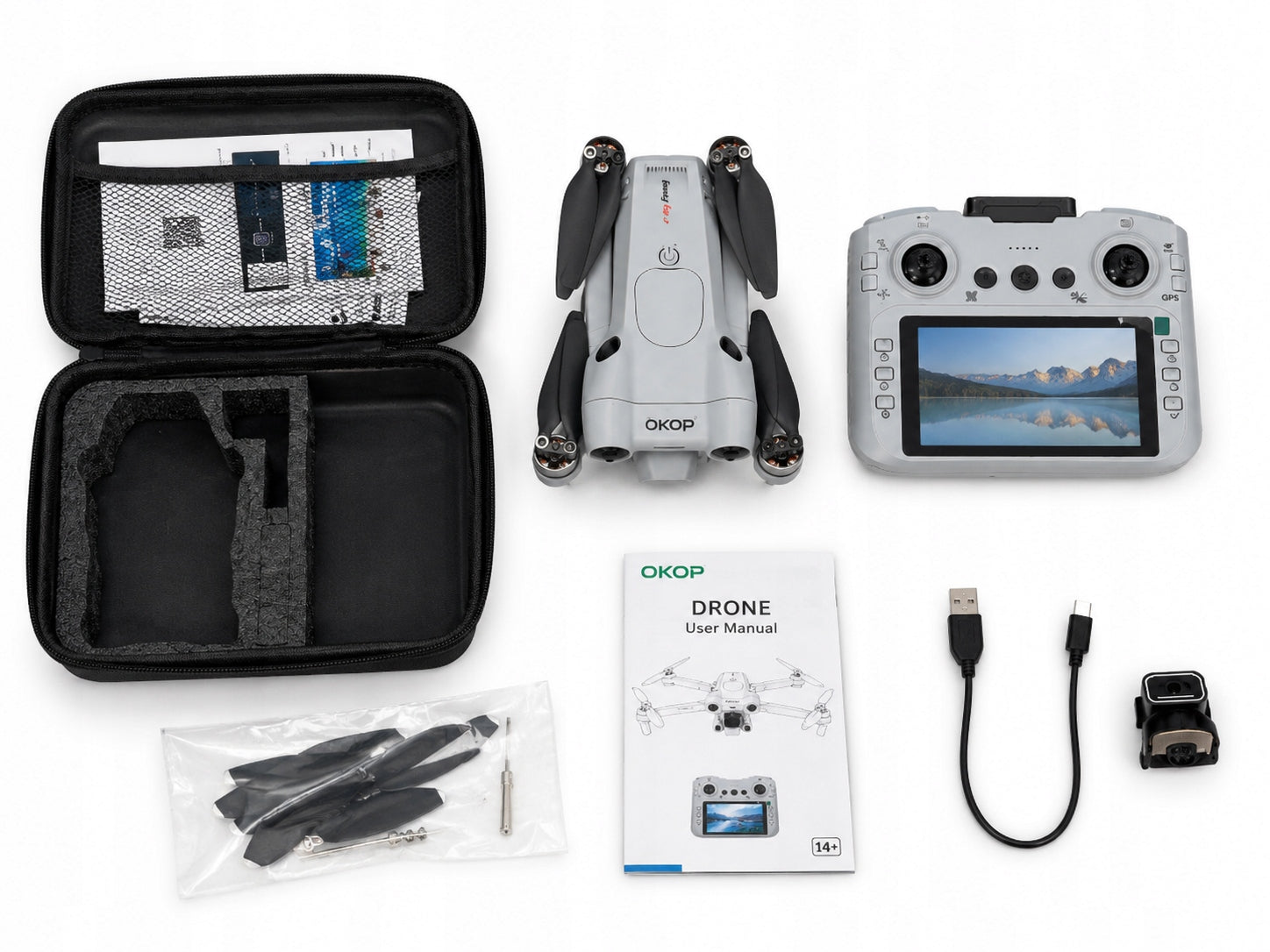
Contents of the set
* DRONE TRENCH KP-M101
* Remote control with 4,3” screen
* Battery for drone
* Spare Propellers
* USB charging cable
* User Manual
* Carrying Case
* Memory card reader (depending on version)
Remote Control Function Description
Top Buttons
Power Button
* Turns the remote control on and off.
Auto Start
* Short press to activate auto start.
Auto Landing
* Short press to activate auto landing.
⸻
Left Side of Remote
Headless Mode
* Control is relative to the operator, regardless of the drone's orientation.
Calibration / Flight Correction
* Used to level the flight when there is a slight drift.
Return to Operator (Return)
* The drone returns towards the takeoff location.
Camera View Switch
* Changes the view between cameras (if the model has two cameras).
Screen Switch
* Turns the image transmission to the remote control on or off.
⸻
Right Side of Remote
Camera Control
* Adjusts the camera tilt angle.
Obstacle Avoidance System (OAS) Switch
* Activates the obstacle detection system.
Photo
* Takes a photograph.
Video Recording
* Starts or stops recording.
Confirm (OK)
* Confirms settings.
⸻
Drone Control
Left Stick
Up
* Ascend.
Down
* Descend.
Left
* Rotate drone left.
Right
* Rotate drone right.
⸻
Right Stick
Up
* Fly forward.
Down
* Fly backward.
Left
* Fly left.
Right
* Fly right.
⸻
First start-up
1. Recharge the battery
* Connect the battery to a USB charger.
* Charging takes about 60 to 120 minutes.
2. Deploy the drone
Spread all your arms.
* Make sure the propellers rotate freely.
3. Insert the battery
* Place the battery in the drone chamber.
* Connect the power cord.
4. Turn on the remote
* Hold down the power button.
5. Turn on the drone
* Press the power button on the housing.
6. Pairing
* Move the left stick up, then down.
* You will hear a signal confirming the call.
Automatic start
1. Set the drone on a flat surface.
2. Start the engines.
3. Press the auto-start button.
4. The drone will fly to a small height.
Automatic landing
1. Press the landing button.
2. The drone will slowly sink and shut down the engines.
Horizontal calibration
If the drone:
* drifts in one direction,
* rotates automatically,
* does not maintain a stable flight,
perform calibration:
1. Set the drone on flat ground.
2. Move both bars inwards and downwards at the same time.
3. Wait about 3 seconds.
4. Flashing diodes will confirm the completion of calibration.
Obstacle avoidance mode (OAS)
1. Turn on the drone.
2. Press the OAS button.
3. The LEDs will start flashing.
4. The drone will detect obstacles in front of it.
Note: The function works best with good lighting.
360° function
1. Raise the drone to a minimum of 2 to 3 m.
2. Press the 360° button.
3. Choose the direction with the right stick.
4. The drone will perform an acrobatic rotation.
Speed control
The remote control offers several speed levels:
* Low – for beginners
* Average – daily fun
* High – fast flight in open space
Photos and recording
Taking photos
* Insert the memory card.
* Press the camera button.
Recording a film
* Press the camera button.
* Pressing again will stop recording.
Safety instructions
* The product is intended for people over 14 years of age.
* Do not fly near airports and power lines.
* Keep a minimum of 5 m from humans and animals.
* Do not use in rain or strong wind.
* Do not touch rotating propellers.
* Do not leave the battery unattended while charging.
* Do not use a damaged battery.
* Store the battery in a dry place.
* Do not expose the battery to high temperatures.
The most common problems
The drone does not take off
* Recharge the battery.
* Check the remote control connection to the drone.
* Perform re-pairing.
Drone tolerates sideways
* Perform horizontal calibration.
No camera image
* Check the camera connection.
* Insert the memory card.
* Restart the remote.
Short flight time
* Fully charge the battery.
* Avoid flying in strong winds.
Specifications
| Group | Name | Value |
|---|---|---|
| Parametry | Condition | new |
| Parametry | Invoice | With VAT invoice |
| Parametry | Brand | no brand |
| Parametry | Assembly | assembled |
| Parametry | Model | DRON Z KAMERA 4K SG901 GPS 5km UNIKANIE PRZESZKÓD |
| Parametry | Drive type | electric |
| Parametry | Camera | drone with camera |
| Parametry | Number of propellers | 8 |
| Parametry | Flight time | 30 min |
| Parametry | Battery capacity | 3800 mAh |
| Parametry | Flight control range | 5200 m |
| Parametry | Product weight with unit packaging | 0.249 kg |
| Parametry | EAN (GTIN) | 641094829377 |
| Parametry | Manufacturer code | DRON Z KAMERĄ SG901 PRO GPS CYFROWY JOYSTICK |
| Parametry | Maximum speed | 35 km/h |
| Parametry | Camera resolution | 4 Mpx |
| Parametry | Product weight | 244 g |
| Parametry | Batteries included | yes |
| Parametry | Packaging status | original |
| Parametry | Age | 14+ years |
| Parametry | Video recording resolution | 4K,1080p (FullHD) |
| Parametry | Certificates of conformity | CE,WEEE |