
Piegādes termiņš katrai precei ir norādīts pie cenas bloka.
Piegāde visā Lietuvā: bez maksas.




Trumpai apie prekę
Prekė: IP kamera WiFi TUYA, 355° sukiojama, 2.4/5 GHz, Full HD 1080p, ONVIF. Kategorija: IP kameros.
- Gamintojas: no brand
- Modelis: Forta KAM-W-1N
- Wireless network connection via WiFi 2,4GHz or 5GHz
- High image quality thanks to Full HD resolution
- Digital Zoom: 4X
- Advanced night mode with infrared (IR)
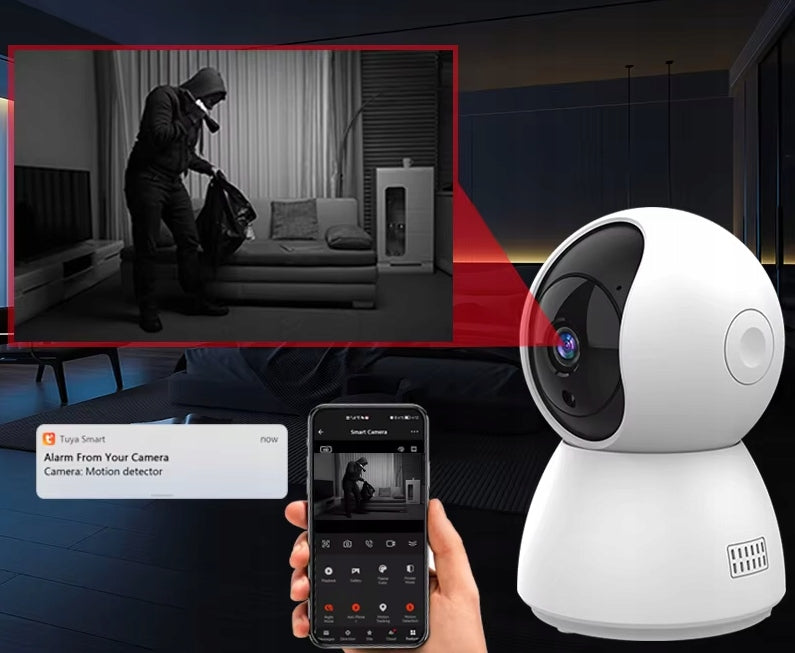
- Automatic motion detection
- Auto Tracking function - tracking of moving objects, detection of human
- Detection Zone Personalization: The ability to define areas in the camera's field of view where detection will be active.
- Preset point function – rotation of the camera towards other smart devices when they are activated, e.g. rotation of the camera towards the part of the room where the opening sensor detected an opening (up to 4 zones).
- Built-in microphone and speaker for double-sided communication
- Rotation of the camera in two planes
- Compatibility with ONVIF
- Memory card support: MicroSD, up to 128GB
The camera with the ability to control the position of the lens offers a very wide viewing angle - up to 355 degrees horizontally and 90 degrees vertically. This feature allows comprehensive observation of the room from virtually any camera location.
The camera is equipped with the following functions:
- "Auto Tracking" - allows you to track moving objects, record their movement and send notifications through the TUYA application. Thanks to this feature, no change in the position of the object will escape your watchful eye.
- "Sound Detection" - allows you to track and record activity in the area when sound is detected. Is your child awake? The camera will inform you immediately, thanks to this feature.
- Preset point function – rotation of the camera towards other smart devices when they are activated, e.g. rotation of the camera towards the part of the room where the opening sensor detected an opening (up to 4 zones).
- Private mode – the camera stops transmitting video and audio signals to protect privacy.
Additionally, you can create a schedule that specifies when the camera should monitor the area and send notifications. If necessary, you can also activate privacy mode, which turns off the camera when it is not needed.
Thanks to the built-in microphone and speaker, the camera can be used as a video intercom or intercom - ideal for communication with a child or the elderly.
The camera captures color images during the day. When the illuminance turns out to be insufficient, the camera automatically, or at the user's request, goes into night mode. 6 IR LEDs in combination with a special IR Cut filter are responsible for capturing a bright and clear image. The effect? Clear and precise grayscale image, regardless of the intensity and type of lighting. The use of infrared technology allows for a detailed view of the image even in complete darkness. Additional lighting with a range of up to 5 meters allows the camera to record even distant objects.
Your family or friends can also conveniently use the camera function in your smart home. If you want, share access to the camera with selected people through the app. Thanks to this, they will also be able to remotely observe rooms, receive notifications about detected movement or sound and use the Auto Tracking function. You can easily make your home a safe place and adapted to the needs of the whole family!
Thanks to the free extension of TUYA - TUYA IPC, it is possible to control our camera also using a laptop or desktop computer. To take advantage of this feature, simply go to protect-eu.ismartlife.me (current only supports Google Chrome) and scan the QR code using the TUYA app on your smartphone.
Monitor the area with your computer, make calls and record simultaneously with up to four cameras directly on your computer.
ONVIF (Open Network Video Interface Forum) is a communication standard in video surveillance systems that enables interoperability between security products, regardless of brand.
With ONVIF support, our TUYA WiFi camera can work with a variety of surveillance systems and security devices, such as:
- video recorders,
- cameras from other manufacturers,
- alarm systems,
- video management systems.
This allows you to easily integrate the camera into your existing security infrastructure and expand your system without the limitations of differences in hardware compatibility.
NOTE: The ONVIF function works only after pairing the camera with the Tuya app. After adding the camera to the app, turn ONVIF on and configure it in Tuya settings. Only then will the camera be available via ONVIF protocol.
- Applications supporting the device: TUYA, TUYA IPC, Smart Life, Home Assistant (ONVIF, TUYA)
- Lens: CMOS 3,6mm Full HD
- Working temperature: from -10 °C to 50 °C
- Maximum permissible humidity: 10-90%
- Video compression: H264
- Micro SD card: up to 128 GB (FAT32 format)
- Angle of rotation: vertically 90 degrees, horizontal 355 degrees
- Night vision range: 5-8 m
- Mirror rotation: Horizontal, vertical
- Microphone, speaker: built-in
- Night mode: infrared (black and white image)
- Network: 2.4GHz & 5GHz Wi-Fi
- IR CUT filter: Built-in
- Power Supply: USB-C 5V 2A (power supply included)
- Dimensions: 115x75mm
The set includes:
- Smart Wi-Fi Camera
- Power cable with adapter
- Wall-ceiling bracket
- Set of screws, studs
As part of the paid Tuya Premium subscription, there is an advanced object detection feature that allows you to intelligently recognize different types of motion and objects in the camera’s field of view.
Basic functions:
- Object differentiation: The camera can distinguish between people, animals (e.g. cats, dogs) and vehicles, minimizing false alarms.
- Person detection: The system can recognize the presence of a human, even if the person is partially obscured (e.g. wears a mask).
- Real-time notifications: The camera sends instant notifications to the user's phone when specific objects are detected.
These functions increase the precision of monitoring and allow you to better adapt the system to the individual needs of the user.
SD card preparation – required before use
For the camera to write data correctly, the SD card must be formatted to the FAT32 file system.
If you are using Windows:
For cards up to 32 GB:
- Put the card in the computer.
- Right-click on the tab icon → select Format.
- In the “File system” field, select FAT32.
- Click “Start” to start formatting.
For cards over 32 GB: Windows does not offer FAT32 by default. In this case, use the free tool:
- FAT32 Format Tool (GUIFormat)
- Download link: https://guiformat.com
The program does not require installation. Select the letter of the SD card, select “FAT32” and click “Start”.
? macOS Users:
Use the built-in Disk Utility (Disk Utility) and select the format MS-DOS (FAT). With cards over 1 GB, the system will automatically format them as FAT32.
Once formatting is complete, the SD card is ready for use on the camera.
FAQ – Frequently Asked Questions
Is the TUYA / Smart Life / eWeLink app free?
Yes, all of these apps are available for free on Google Play and the App Store. Optional paid features such as e.g. sending SMS notifications to the phone number is not required for basic operation of devices – control and reception of notifications by the application remain free.
Do I need additional devices besides my phone?
It depends on the communication protocol of the device:
– Wi-Fi: all you need is a home Wi-Fi router that supports the 2.4 GHz band.
– Bluetooth: no additional devices are required.
– Zigbee: in addition to the Wi-Fi router, you must have a compatible Zigbee gateway (bridge/coordinator). Details available in product specification.
Is the application in Polish (or Czech)?
The TUYA, Smart Life and eWeLink applications offer partial interface translation – many elements are available in Polish and Czech, but some functions and settings (including option names in scenes and automations) may be available in English. Still, using the app remains intuitive and convenient.
Is it difficult to configure devices?
The process of adding devices is usually very simple. After the first startup, many models automatically enter pairing mode (indicated by the pulsing of the LED), or it can be activated manually by holding the RESET button on the housing for 5 to 10 seconds. The application guides you step by step through the entire configuration process.
Will the device work without internet access?
Most Wi-Fi-based smart devices require a constant connection to the internet and the cloud (e.g. TUYA or eWeLink). In the absence of it, remote control and schedule and automation functions stop working. Select Zigbee or Bluetooth devices can function locally if they work with an offline automation gateway.
FAQ – Frequently Asked Questions
Is the TUYA / Smart Life / eWeLink app free?
Yes, all of these apps are available for free on Google Play and the App Store. Optional paid features such as e.g. sending SMS notifications to the phone number is not required for basic operation of devices – control and reception of notifications by the application remain free.
Do I need additional devices besides my phone?
It depends on the communication protocol of the device:
– Wi-Fi: all you need is a home Wi-Fi router that supports the 2.4 GHz band.
– Bluetooth: no additional devices are required.
– Zigbee: in addition to the Wi-Fi router, you must have a compatible Zigbee gateway (bridge/coordinator). Details available in product specification.
Is the application in Polish (or Czech)?
The TUYA, Smart Life and eWeLink applications offer partial interface translation – many elements are available in Polish and Czech, but some functions and settings (including option names in scenes and automations) may be available in English. Still, using the app remains intuitive and convenient.
Is it difficult to configure devices?
The process of adding devices is usually very simple. After the first startup, many models automatically enter pairing mode (indicated by the pulsing of the LED), or it can be activated manually by holding the RESET button on the housing for 5 to 10 seconds. The application guides you step by step through the entire configuration process.
Will the device work without internet access?
Most Wi-Fi-based smart devices require a constant connection to the internet and the cloud (e.g. TUYA or eWeLink). In the absence of it, remote control and schedule and automation functions stop working. Select Zigbee or Bluetooth devices can function locally if they work with an offline automation gateway.
I have a Smart Life app, will the TUYA device work in it?
Yes, TUYA devices work in the Smart Life app because both apps are based on the same platform. They differ mainly in the appearance of the interface and the brand, but the functionality remains the same. However, it is recommended to use only one of them on your phone to avoid pairing and connectivity issues.
Are TUYA and eWeLink compatible with each other?
No, TUYA and eWeLink devices use separate ecosystems and vendor clouds. This means that each device can only be added to the application for which it was designed. However, it is possible to support them in parallel in one multi-platform application (e.g. Google Home, Amazon Alexa, Apple Home) if both systems are integrated there.
Specifications
| Group | Name | Value |
|---|---|---|
| Parametry | Condition | new |
| Parametry | Invoice | With VAT invoice |
| Parametry | EAN (GTIN) | 721820776608 |
| Parametry | Manufacturer code | Krasław |
| Parametry | Brand | no brand |
| Parametry | Model | Forta KAM-W-1N |
| Parametry | Kind | internal |
| Parametry | Batteries included | no |