
Piegādes termiņš katrai precei ir norādīts pie cenas bloka.
Piegāde visā Lietuvā: bez maksas.




Trumpai apie prekę
Prekė: Elektrinis stiklo konvektorius 2400W, su WiFi, energiją taupantis. Kategorija: Konvektoriniai radiatoriai.
- Gamintojas: Mission Air
- Modelis: PORTO 2400W Czarny
- Plotis: 1050 mm
- Aukštis: 380 mm
- Spalva: black
✅ Glass front panel
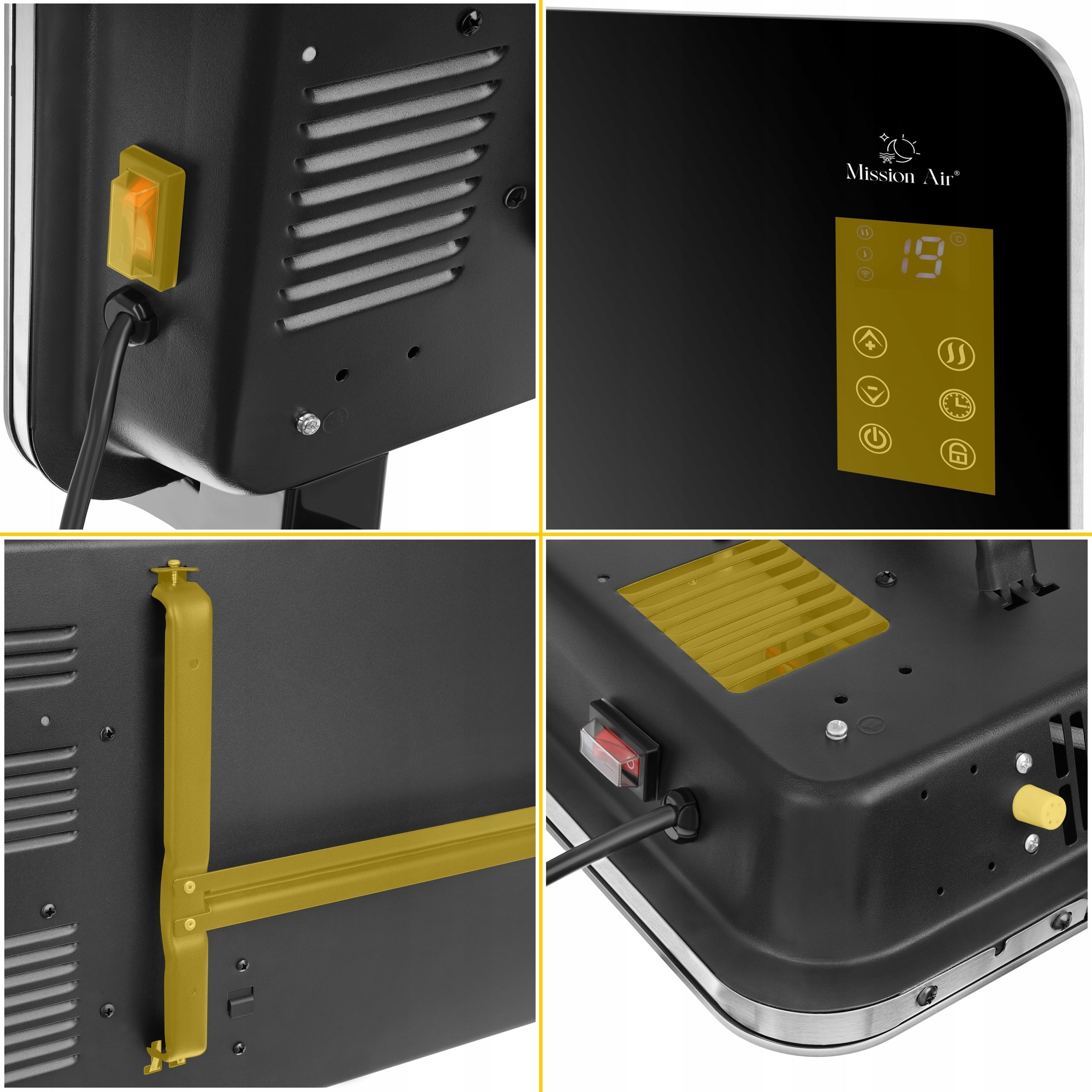
✅ Digital touch panel: display, temperature + and −, power, mode, timer, child lock
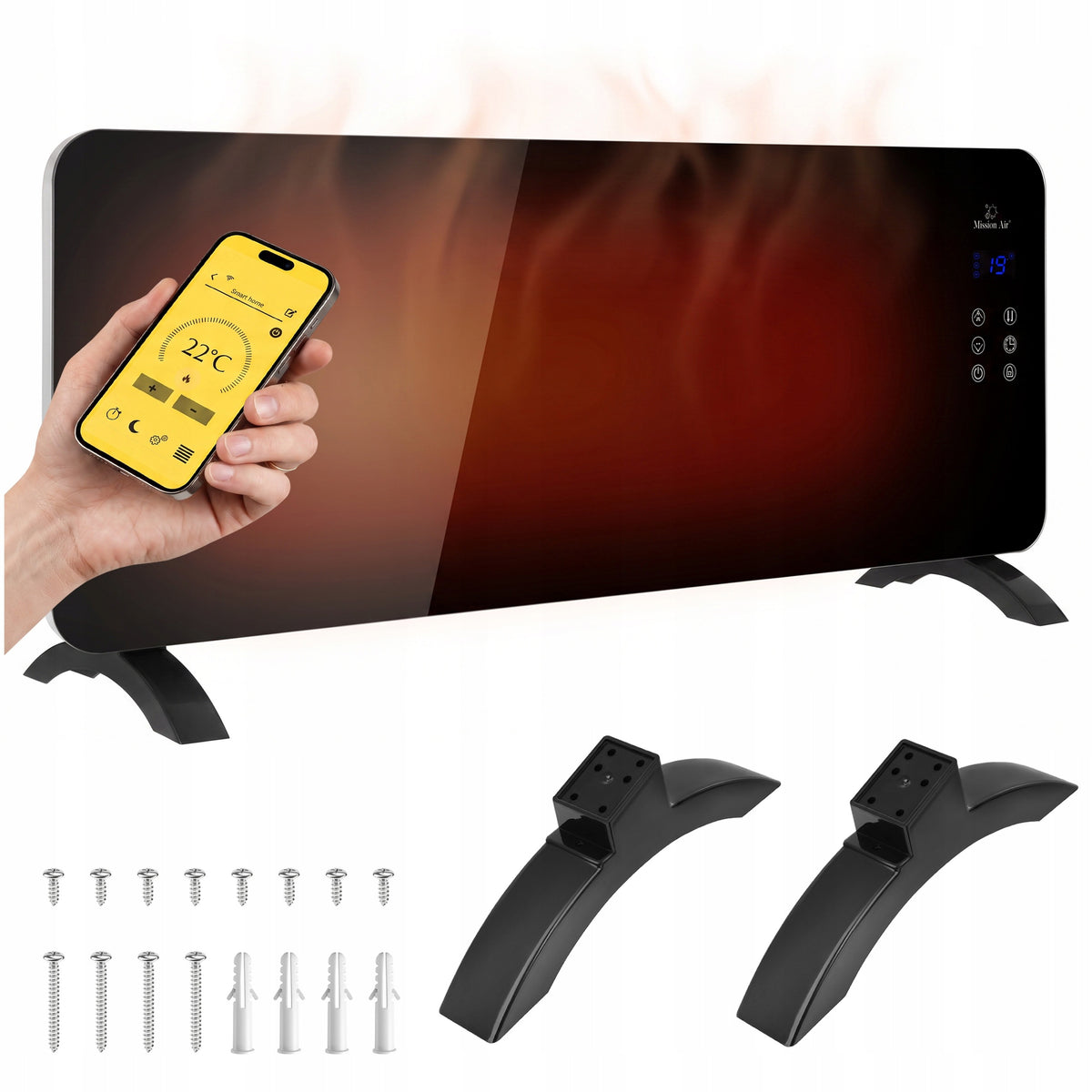
✅ Control from your phone via Mission Air app or Tuya Smart (Android / iOS) with weekly programmer
✅ Temperature setting range 5-40 °C · timer 1-24 h
✅ Two operating levels: low (half power) and high (full power)
✅ Child lock activated by holding the button for 3 seconds
✅ X-shaped heating element
✅ Wall mounting with bracket or freestanding on legs - kit included
✅ IP24 waterproof · power supply 220-240 V, 50–60 Hz, grounded socket
Type: electric convector
Portable: yes
Wall/installed: yes
Termostat: yes ,electronic
Power supply: 230V
Power: 2400W
Color: black
Overheating protection: yes
Degree of protection: IP24
Device dimensions (H /W. /head): 38/ 105/ 9 cm
Power cord length: 1,5 m
Weight: 8,8 kg
Legs: included
Wall mounting hardware: included
1 Convector heater Porto Black 2400W
2 Feet (freestanding setting)
3 Set of screws for hanging mounting
4 Original product packaging
🔥X-Element™ Core - the X-shaped heating element is responsible for the high heating efficiency of the device.
🏗 GlassLine™ Design - front glass panel in black. A heater that looks like an element of decor, not like heating equipment.
🎛 SmartTouch™ WiFi Panel - digital thermostat with display, control from the phone via the Mission Air or Tuya Smart application. Full control 24/7.
💧AquaShield™ IP24 - IP24 rating means complete safety in the bathroom, kitchen and wherever there is moisture.
🛡 ChildLock™ Safe - activate the parental lock with one button. Children will not change the temperature or operating mode settings.
⚡TimerPro™ 24h - set which heater to turn on or off. Are you coming home from work at 17:00? At 16:30 the heater is already heating.
⚡DualMode™ ECO/Comfort - ECO mode cuts power in half. You maintain the temperature without sacrificing comfort.
🔄FlexMount™ Duo - wall mount for space saving or on legs for mobility. Set included.
✔ A heat source that looks like an element of decor, not like a heating device.
✔ Temperature set by number and visible on the display - without guessing the position of the knob.
✔ Two ways to operate to choose from: panel on the device and phone.
✔ Week planned once - the programmer in the application watches the working hours for you.
✔ Wear control: the timer completes operation at the set time, and the low power level maintains the temperature.
✔ Tranquility about settings at home with children - the parental lock turns on with the touch of a button.
✔ A device adapted to humid rooms, with IP24 water resistance.
❓ How to turn on the heater after plugging it in?
✅ First, turn on the switch on the side of the housing, then press the "power ON/OFF" button on the panel. The display will show the current room temperature.
❓ How to connect the heater to the app?
✅ Install the Mission Air or Tuya Smart app and create an account or log in to an existing one. Turn on WiFi on your phone and place the device within router range - the indicator light will start flashing rapidly. If it's not flashing, hold the mode button for 5 seconds. You can then use automatic configuration ("Add device") or manual: "Add device" → "Small home appliances" → "Heater (Wi-Fi)".
❓ What temperature range can I set?
✅ From 5 to 40 °C, using the temperature + and − buttons on the panel or within the app.
❓ What is the timer for?
✅ It allows you to schedule the device to turn on or off at a selected time, within a range of 1 to 24 hours.
❓ What is the difference between the two operating levels?
✅ High level means full rated power of the variant, low level means half of that value: 500 W in the 1000 W model, 750 W in the 1500 W, 1000 W in the 2000 W, and 1200 W in the 2400 W. You switch levels using the "mode" button.
❓ How to activate the child lock?
✅ Hold the lock button for 3 seconds. You turn it off the same way. Once activated, the panel will not respond to touch, so temperature and mode settings will remain unchanged.
❓ Can I connect the heater to an external programmer or a socket with a timer?
✅ No. The PORTO manual explicitly forbids this – using the heater with a programmer, timer, or any other device that turns it on automatically carries a fire risk. Schedule operation using only the built-in timer and weekly programmer in the app.
❓ How much space should I leave during installation?
✅ The manual states: at least 15 cm from the floor and 50 cm from the ceiling. It is forbidden to place the device under an electrical outlet, and during installation, pay attention to the heater's position relative to other objects.
❓ Can I hang the PORTO in the bathroom?
✅ IP24 waterproof is confirmed in the manufacturer's specifications. The manual allows installation in bathrooms, with the condition that water accumulation on the device surface must be prevented, and the location must respect protective zones applicable in rooms with a bath or shower.
❓ How to care for the heater between seasons?
✅ Wait for the device to cool down and disconnect it from the power supply. Regularly remove dust from the surface, and wipe the glass panel and housing with a soft damp cloth – without abrasive materials or solvents. Do not wash the device or immerse it in water. For a long break, wipe the housing, pack the heater in its box, and store it in a dry, ventilated room.
🔥Living room, in which heater has not throw in eyes
The glass panel in white or black reads like an element of decor, not like heating equipment. Hanging on the wall takes 9 cm deep and does not block the passage.
🔥Bedroom with specific temperature
Instead of looking for the correct position of the knob, you enter a number in the range of 5-40 °C. The display shows the temperature in the room, and the device maintains the setting without blowing.
🔥Bathroom without heating floor
IP24 waterproof allows you to mount the heater in a humid room, outside the protection zones around the bath and shower, while maintaining 15 cm from the floor and 50 cm from the ceiling.
🔥 House with children
After setting the temperature, hold the lock button for 3 seconds. The panel stops responding to touch and the settings stay as you left them.
🔥Evening with planned end heating
The timer turns off the device at a set time, so you do not have to remember this before bedtime.
🔥Spring i autumn, when central heating not works
For several weeks a year, one device with a weekly programmer set for mornings and evenings is enough, without starting the entire installation.
🎨 Interior designer: Does not want the heater to spoil the arrangement. The glass front in white or black looks like an element of decor.
🚿 Bathroom owner without underfloor heating: Needs a moisture-adapted device - PORTO has IP24 water resistance.
📱 Smart home user: Controls the heating from the phone and plans a week in the application programmer.
👶 Parent of a small child: Enables parental lock by holding down the button and is sure that the settings will be intact.
🌡 A person who likes specific numbers: Sets the temperature in the range of 5-40 °C and sees it on the display instead of guessing.
🖤 Dark interior lover: Chooses a version with a black glass panel, tailored to the loft arrangement (white model available at a separate auction).
🧾 Person guarding power consumption: After heating the room, it goes to a low power level and limits the working time with a timer.
❓ What if the glass panel is just for design and it heats poorly?
💪 Glass is a front finish, not a heating element. An X-shaped element works underneath with the full rated power of the variant, up to 2400 W, depending on the selected model. Additionally, there's a digital thermostat with a range of 5-40 °C, a 1-24 hour timer, child lock, and IP24 waterproofing.
❓ What if I don't want to use the app?
💪 You don't have to. You can control the temperature, power level, timer, and child lock directly from the touch panel. The app adds remote control and a weekly programmer, but it's not required for the device to work.
❓ What if the power is not enough for my room?
💪 The PORTO series includes four variants: 1000 W, 1500 W, 2000 W, and 2400 W. An approximate guideline is 1 kW per approx. 10 m² of well-insulated interior. For a corner room, large windows, or a high ceiling, consider a power reserve instead of just calculating square meters.
❓ What if I want the heater to turn on automatically at a set time?
💪 The built-in timer and weekly programmer in the app are for this purpose. However, the manual prohibits connecting the device to external programmers and timer sockets – such solutions carry a fire risk.
❌MYTH 1: The glass front is just decoration that makes heating worse.
✅FACT: The glass panel is a housing finish. The heating element and convection channel are responsible for heat output, and the rated power is the same as in models with a steel front of the same wattage.
❌MYTH 2: A heater with WiFi can be connected to any socket with a timer.
✅FACT: No. The PORTO manual prohibits using the device with external programmers, timers, and any other device that turns it on automatically, citing fire risk. Scheduling is done via the built-in timer and the app's programmer.
❌MYTH 3: Since the heater has IP24, it can be placed anywhere in the bathroom.
✅FACT: IP24 means resistance to water splashes from any direction, not permission for any placement. The manual requires that when installing in a bathroom, water accumulation on the surface must be prevented, and the location must respect the protective zones defined by regulations.
❌MYTH 4: A convector needs a fan for heat to reach the back of the room.
✅FACT: Natural convection works without forced airflow: cool air enters from the bottom, heats up at the heating element, and rises from the top. Air movement occurs naturally due to density differences.
❌MYTH 5: A more powerful heater will always use more electricity.
✅FACT: Consumption depends on the heating element's operating time, not the rating plate. A device with power matched to the room will reach the set temperature faster and enter standby more often, while an underpowered heater might run almost continuously.
1 Unpack i check set
Remove the heater from the box, remove the packaging and check the installation parts: feet with screws, wall bracket, screws and dowels. Do not connect the plug yet.
2 Select way setting
Freestanding: Screw the feet to the base with the included screws. Wall-mounted: remove the bracket from the body, drill holes, slide the dowels in, screw the bracket with screws, hang the heater and tighten the screws at the top of the bracket.
3 Keep required spacing
At least 15 cm from the floor and 50 cm from the ceiling. Do not mount the device under an electrical outlet and do not cover the ventilation openings.
4 Enable i set temperature
Connect the plug to the grounded socket, move the switch on the side of the housing, and then press “ON/OFF power”. The display will show the temperature in the room. With the “mode” button, select the low or high level, and with the temperature + and − buttons, set the value in the range of 5-40 °C.
5 Add heater to application (optional)
Install the Mission Air or Tuya Smart app, create an account and turn on WiFi on your phone. When the indicator light starts flashing quickly, add the device automatically or manually: “Add the device” → “Small home appliances” → “Heater (Wi-Fi)”. Then you can set up a weekly programmer.
By choosing Mission Air products, you get the Mission Air SHIELD package. This is an additional after-sales care, thanks to which you can be sure of peaceful and comfortable use of the purchased device.
Specifications
| Group | Name | Value |
|---|---|---|
| Parametry | Condition | new |
| Parametry | Invoice | With VAT invoice |
| Parametry | Brand | Mission Air |
| Parametry | Color | black |
| Parametry | Heating power | 2400 W |
| Parametry | Connection method | side |
| Parametry | Height | 380 mm |
| Parametry | Width | 1050 mm |
| Parametry | Depth | 90 mm |
| Parametry | Product weight with unit packaging | 10 kg |
| Parametry | Manufacturer code | PORTO 2400W Czarny |
| Parametry | EAN (GTIN) | 5904890249523 |
| Parametry | Packaging status | original |